kernel driver 使用 gpio
Kernel Level
- Allocate memory to GPIO line, can be achieved by doing
gpio_request()
err = gpio_request(30, "sample_name");
- Depending on the requirement set GPIO as input or output pin then set gpio value as high or low.
gpio_direction_input(30);
gpio_direction_output(30, 1);
gpio_export(30, true);
gpio_get_value(30);
檢查GPIO被使用掉哪些
# cat /sys/kernel/debug/gpio

User Space - Sysfs control
- Enable GPIO sysfs support in kernel configuration and build the kernel
Device Drivers --- > GPIO Support --- > /sys/class/gpio/... (sysfs interface)
- Sysfs entries
- Export the particular GPIO pin for user control. GPIO30 is taken as example.
$ echo 30 > /sys/class/gpio/export
- Change the GPIO pin direction to in/out
$ echo "out" > /sys/class/gpio/gpio30/direction
$ echo "in" > /sys/class/gpio/gpio30/direction
- Change the value
$ echo 1 > /sys/class/gpio/gpio30/value
$ echo 0 > /sys/class/gpio/gpio30/value
- Unexport the GPIO pin
$ echo 30 > /sys/class/gpio/unexport
$ mount -t debugfs debugfs /sys/kernel/debug
$ cat /sys/kernel/debug/gpio
用户空间访问gpio,即通过sysfs接口访问gpio
下面是/sys/class/gpio目录下的三种文件:
--export/unexport文件
--gpioN指代具体的gpio引脚
--gpio_chipN指代gpio控制器
必须知道以上接口没有标准device文件和它们的链接。
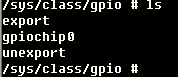
图3-1
3.1. export/unexport文件接口
/sys/class/gpio/export,该接口只能写不能读。
用户程序通过写入gpio的编号来向内核申请将某个gpio的控制权导出到用户空间,前提是没有内核代码申请这个gpio端口,如用户申请编号为12的GPIO的命令:
echo 12 > export/sys/class/gpio/unexport和导出的效果相反,比如移除gpio12这个节点操作命令:
echo 12 > unexport
3.2. /sys/class/gpio/gpioN
指代某个具体的gpio端口,里边有如下属性文件:
**direction**表示gpio端口的方向,读取结果是in或out。也可以对该文件进行写操作,写入out 时该gpio设为输出同时电平默认为低。写入low或high时不仅可以设置为输出还可以设置指定的输出电平。 当然如果内核不支持或者内核代码不愿意,将不会存在这个属性,比如内核调用了gpio_export(N,0)就表示内核不愿意修改gpio端口方向属性 。
**value**表示gpio引脚的电平,0表示低电平,1表示高电平;如果gpio被配置为输出,这个值是可写的,记住任何非零的值都将输出为高电平。如果某个引脚被配置为中断,则可以调用poll(2)函数监听该中断,中断触发后poll(2)函数就会返回。
3.3. 示例
非中断模式
读操作
int getGpioValue(int port),传入要读去掉端口号,返回该端口值(0或1);
写操作
void setGpioValue(int port, int value),传入要设置的端口号和值。

留言
張貼留言